TL;DR
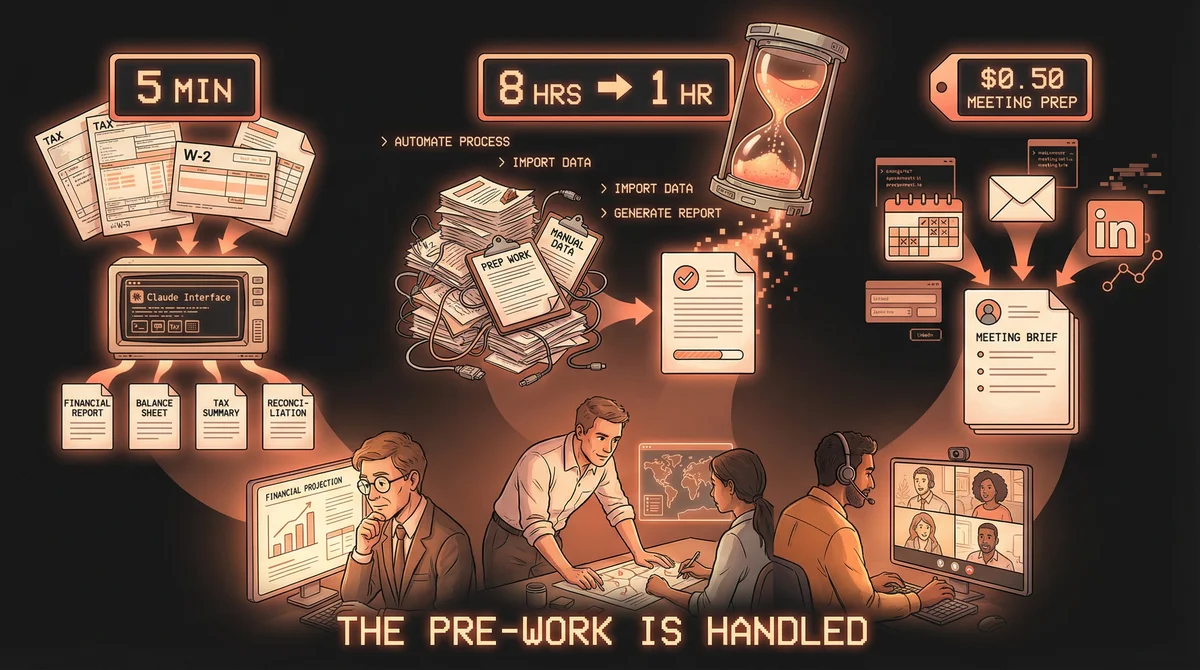
- Arnold Dizon (bookkeeper): 5-minute tax client onboarding — W-2 in, proforma + Form 8879 + client email + 40 compliance checks out. 75+ hours reclaimed per tax season.
- Alex Forbes (ops lead): 8-hour documentation projects completed in 60 minutes, using Claude with Google Drive and Notion MCP connections.
- Suraj Saste (product manager): Full meeting prep — calendar check, Zoom notes, Gmail history, LinkedIn research — automated for $0.43–0.90 per meeting.
- Pattern: All three automated the mandatory pre-work that consumed their best hours before the actual job could start.
The worst part of most professional jobs isn’t the hard work. It’s the hours that happen before the hard work can start.
Tax season for a bookkeeper means weeks of new client onboarding — collecting W-2s, generating forms, running compliance checks — before any actual return work begins. Documentation for an ops team means two days of drafting before anyone reviews quality. Customer meetings for a product manager mean 20 minutes of LinkedIn and email archaeology before every call.
Three professionals automated exactly this: the pre-work. Here’s how.
Arnold Dizon’s 5-Minute Tax Machine
Arnold Dizon is a bookkeeper. Every new tax client triggers the same set of deliverables: a proforma tax estimate, Form 8879 for IRS e-file authorization, an onboarding email, and a compliance scan for red flags.
It used to take what it takes. Now it takes five minutes.
Arnold built a Claude Skill that processes new clients from a single input: their W-2 documents.
Upload the W-2s. The Skill runs. Output:
- Tax proforma (projection based on the actual figures)
- Form 8879 (pre-filled, ready for signature)
- Client email (ready to send)
- 40 red flag checks (compliance and accuracy review)
Five minutes. Complete.
Over a full tax season, that adds up to 75+ hours reclaimed — time Arnold spends on returns that actually require a bookkeeper’s judgment, not on document assembly that follows a fixed process every time.
He liked the result enough to productize it. The Skill is available for $97 as a tool for other bookkeepers and tax preparers facing the same seasonal bottleneck.
Alex Forbes’s Documentation Hour
Alex Forbes works in operations. Documentation is a core deliverable — process guides, internal references, team handbooks — and it was burning him out before the real work started.
“Previously, I would have been burnt out from writing and documenting by the time I need to focus on quality and implementation.”
The problem wasn’t the complexity of what he was writing. It was the gather-and-draft phase: pulling context from internal Drive files, understanding background, synthesizing inputs from multiple sources, producing a first draft that needed heavy revision before it was useful to anyone.
Alex connected Claude Desktop to Google Drive and Notion using MCP integrations — native connectors that require no code, just activation and sign-in.
The workflow:
- Alex provides a prompt with background and the angle he wants captured
- Claude reads the relevant Google Drive files for internal context
- Claude drafts the document and publishes it directly to a Notion database page — not to the chat window, to the actual destination
- Yellow highlights mark RFI items (information still needed)
- Team members comment in Notion
- Claude revises based on comments, with green highlights on changed text
- Version history is maintained automatically as sub-pages
“8 hours of work within 1 hour.”
The quality is better than starting from scratch because Claude synthesizes context directly from the source files. Alex’s attention goes to precision, nuance, and final judgment — not to generating something reviewable from nothing.
“I feel like real productivity like this was AI witchcraft not even 6 months ago. Now you click a few buttons and Claude makes sense of the back end of anything you connect it to.”
Suraj Saste’s $0.50 Meeting Brief
Suraj Saste is a product manager with a calendar full of customer meetings. The pre-meeting routine was predictable: check if they’ve met the person before, pull up Zoom notes from previous calls, search LinkedIn on external participants, scan relevant email threads, synthesize it all into context he could actually use walking into the room.
Twenty minutes of research per meeting. Every meeting.
Suraj built a meeting prep agent at a single-day hackathon using OpenClaw. The system connects to his calendar, Zoom meeting transcripts via API, Gmail, and LinkedIn search.
When a meeting appears on the calendar, the agent generates a prep report:
- Participant background (LinkedIn on anyone external to the company)
- Past interaction history (from Zoom AI meeting notes)
- Email context (relevant Gmail threads)
- Meeting objectives and open items
Cost per meeting: $0.43 to $0.90.
For a PM running multiple customer calls a day, that’s under a dollar to eliminate the morning archaeology. The agent handles the WHO, WHY, and WHAT — context that used to require manual assembly at 8am before a 9am call.
The Pattern
All three stories follow the same logic.
Arnold isn’t automating tax expertise. He automated document assembly — the fixed-process work that happens before expertise is relevant.
Alex isn’t automating editorial judgment. He automated context gathering and first-draft generation — the hours of setup before quality review begins.
Suraj isn’t automating customer conversations. He automated background research — the repetitive information synthesis before the actual meeting.
None of them stopped doing their jobs. They stopped spending their best hours on the part that was never actually their job in the first place.