TL;DR
- A UK app founder gave OpenClaw full TikTok analytics access and told it to grow his app — the AI runs 24/7 without check-ins
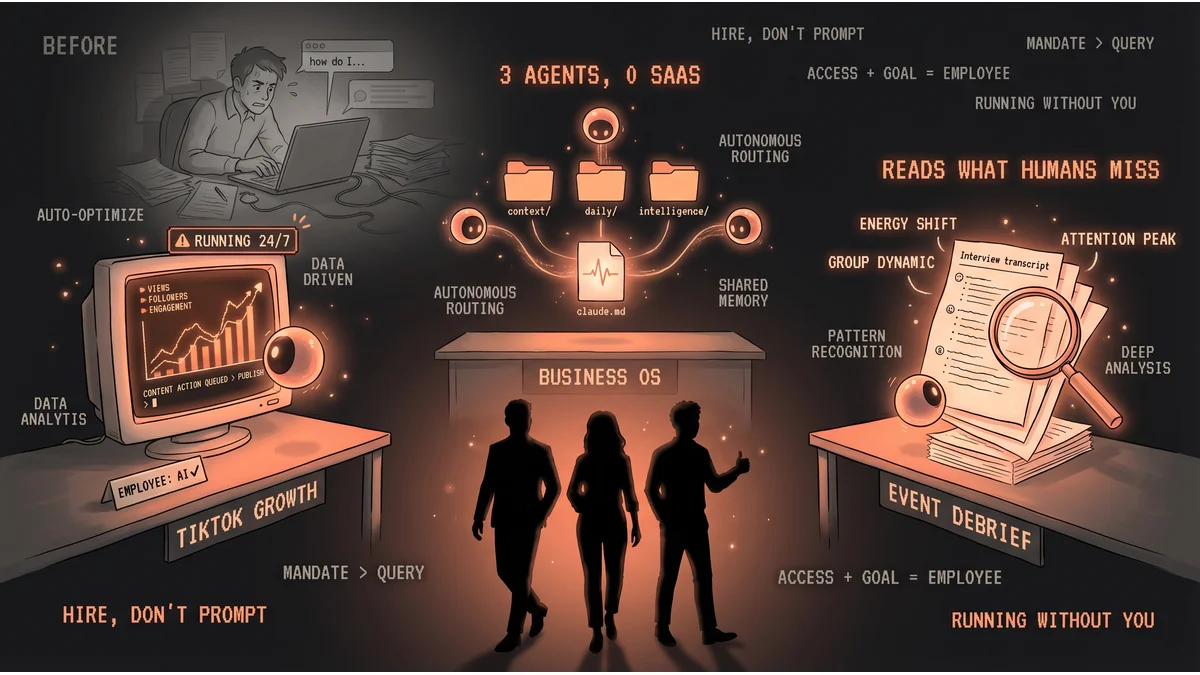
- An operator built a zero-SaaS stack: one Markdown folder, three AI agents, and a routing file that acts as the shared employee handbook
- An event designer runs Claude Code on participant interview transcripts to surface psychological patterns no human would catch alone
- Best for: founders and operators who have recurring functions they currently handle themselves
- Key lesson: the shift from “asking AI” to “delegating to AI” doesn’t require more technical skill — it requires a different decision
There’s a version of AI use where you type questions and it answers. These three founders skipped that entirely.
Instead, they gave AI a job description, handed over the relevant data, and got out of the way. The difference isn’t technical. It’s a decision about what role AI plays in the operation.
The TikTok Manager Who Works Around the Clock
A developer in England had an app he wanted to grow on TikTok. Instead of posting manually or hiring a social media manager, he spun up an AI employee using OpenClaw — the same agentic platform behind this site.
He gave it one brief: grow the app. Then he gave it what it needed to do the job: full access to his TikTok analytics.
The AI has been running it 24/7 since. No morning check-in required. No “what should I post today?” prompts. The agent monitors performance, identifies what’s working, and keeps running — on its own schedule, without waiting to be asked.
The takeaway from people watching this: the unlock wasn’t the technology. It was the decision to treat AI like an employee with a mandate rather than a tool that waits for queries.
The Business That Runs on a Folder
@Atenov_D runs a business without a single SaaS subscription for internal operations. Instead: a local folder of Markdown files and three AI agents.
The folder is the operating system. Inside it: brand and strategy in a context/ directory, daily activity logs, a intelligence/ folder for research and analysis, and a skills/ library of process templates. One root-level routing file acts as the shared brain — it tells every agent what’s where, what’s current, and what to prioritize.
When a client profile changes, it updates in one place. All agents know immediately. When priorities shift, same. The agents maintain awareness of brand voice, active tasks, and current goals — without anyone briefing them individually at the start of each session.
The cost: less than a typical SaaS stack. The flexibility: complete. No vendor lock-in, no syncing issues, no pricing changes mid-year.
The insight: a well-structured folder and a README can serve as an employee handbook that three agents share continuously.
The Event Designer Who Debriefs With AI
Andrew Monroe runs Bullish Events, designing and producing in-person experiences. Between events, he interviews participants — gathering responses about what worked, what landed, what they were actually feeling.
Those interviews generate transcripts. The transcripts contain patterns — subtle ones about group dynamics, attention, energy shifts — that are “almost impossible to see without a PhD in human psychology,” as Monroe put it.
He built a Claude Code workflow to read them. Claude processes all the interview responses, surfaces the embedded themes and psychological patterns across the participant set, and gives Monroe a structured picture of what the audience experienced. He uses that to redesign the next event.
The AI doesn’t attend the event. It shows up after, reads everything, and hands Monroe a map of what people actually felt. The design decisions stay with him.
The Pattern
Three industries. Three tools. One underlying move: instead of asking AI to help with a task, they assigned AI to own a function.
The app founder didn’t prompt “what should I post on TikTok?” He assigned TikTok growth to an agent with the analytics to do it. The operator didn’t ask agents for advice. He structured the data so agents could find what they need and run independently. The event designer didn’t ask “what themes came up?” He built a process where Claude reads every transcript before any human analysis begins.
In each case, the AI isn’t waiting to be asked. It has access, context, and a goal. That’s the operational difference between a chatbot and an employee.