TL;DR
- Writer increased output from 8,000 to 35,000+ words per month with same working hours
- Claude Code used as thought partner for exploration, research, drafting, and feedback
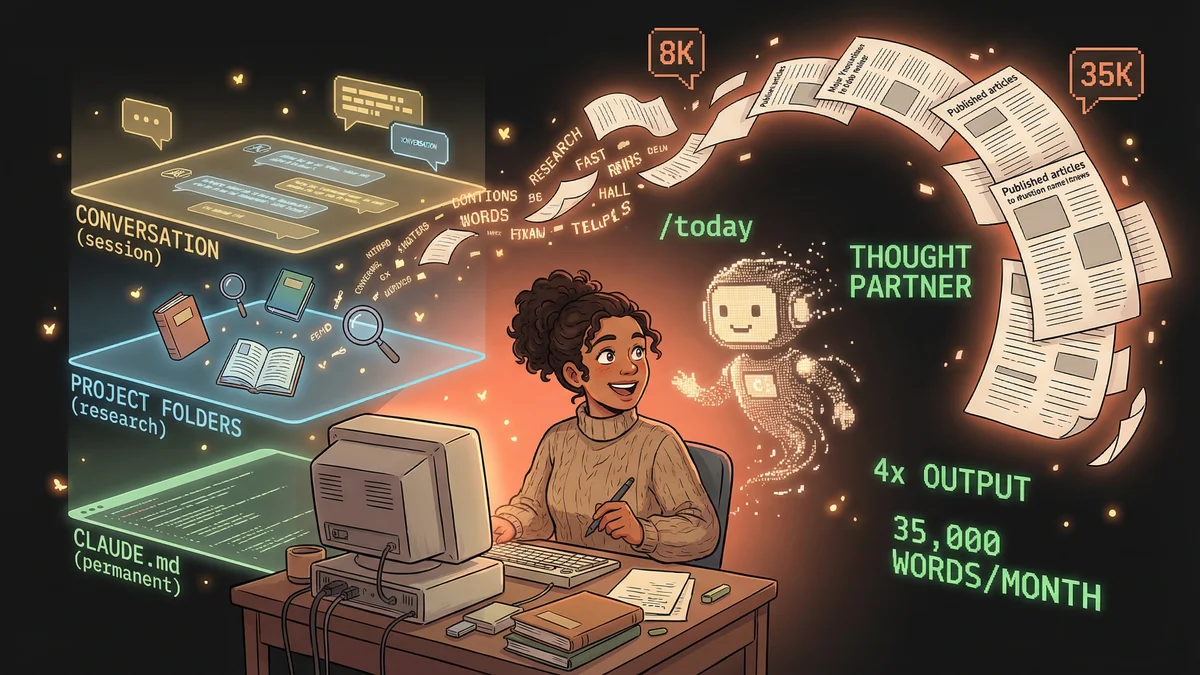
- Three-layer context system (CLAUDE.md, project folders, session) enables consistent voice
- Best for: professional writers, content creators, anyone overwhelmed by research-to-publication gap
- Key lesson: AI does not just help with mechanics; the back-and-forth actually sharpens your thinking
A product coach 4x’d her writing output by making Claude Code her thought partner, using a three-layer context system that transformed writing from draining to energizing.
Teresa had a problem most writers would kill for: too many ideas.
Articles half-written in Google Docs. Research scattered across 47 browser tabs. Outlines started and abandoned. A backlog of topics her audience kept asking about.
She published maybe 8,000 words a month. It wasn’t bad. But she knew she had more to say.
The obstacle wasn’t creativity. It was everything between the idea and the published piece. The research rabbit holes. The blank-page paralysis. The endless “is this good enough?” spiral.
The Productivity Trap
Teresa had tried everything:
- Time blocking (didn’t stick)
- Writing sprints (burned out)
- AI chatbots for drafts (sounded robotic)
- Hiring help (too expensive, too slow)
Each solution solved one problem while creating another. She was working harder, not smarter, and her output stayed flat.
Then someone mentioned Claude Code could work with local files. With her files. Her research. Her notes. Her voice.
The Workflow That Changed Everything
Teresa now starts every day with one command:
/todayThat’s it. One word. Claude Code knows what to do because she set it up that way.
What happens when she types /today:
- Claude pulls her Trello tasks and creates a prioritized to-do list
- It scans recent research papers in her reading folder and summarizes what’s new
- It checks her draft folder and suggests which piece is closest to publication
- It sends a Slack update to her team about her focus for the day
Her morning used to be 45 minutes of administrative setup. Now it’s 2 minutes of reviewing what Claude prepared.
The Writing Partnership
Here’s where it gets interesting. Teresa doesn’t use Claude to write for her. She uses it to think with her.
Stage 1: Exploration
"I want to write about [topic]. Here's what I think I know.
Challenge my assumptions. What am I missing?
What questions would a skeptical reader ask?"
Claude pushes back. Points out gaps. Asks questions she hadn’t considered. It’s like having a debate partner who never gets tired.
Stage 2: Research
"Search my research folder for anything related to [topic].
Pull relevant quotes and data.
Add these sources as citations in my outline."
No more digging through folders. No more “I know I saved that study somewhere.” Claude finds it, organizes it, cites it.
Stage 3: Drafting
"I'm writing section 3 of this article.
My outline says it should cover [X].
Here are my rough notes.
Help me turn this into a clear 500-word section."
Stage 4: Feedback
"Read this section. Is the argument clear?
Does it flow from the previous section?
Is there anything that sounds preachy or obvious?
Be honest - I want to publish something great, not just finished."
Claude gives feedback she can actually use. Specific. Constructive. Not “looks good!” but “paragraph 3 makes a jump that might lose readers.”
The Results
Before Claude Code:
- 8,000 words published per month
- 2-3 articles
- Constant feeling of being behind
After Claude Code:
- 35,000+ words published per month
- 8-10 articles
- Writing feels energizing instead of draining
That’s not a typo. 4x output. Same number of working hours.
The Part That Surprised Her
Teresa expected Claude to help with the mechanical parts of writing. The research, the formatting, the tedious stuff.
What surprised her: Claude made her a better thinker.
Having to explain her ideas clearly enough for Claude to work with them forced her to sharpen her arguments. Claude’s questions revealed assumptions she’d glossed over. The back-and-forth improved her reasoning before she ever published.
“Using Claude Code isn’t about being technical,” Teresa says now. “It’s about being willing to try three to four simple commands. That’s it.”
The Three-Layer Context System
Teresa’s secret weapon is what she calls the “three-layer context system”:
Layer 1: CLAUDE.md (permanent context) A file that tells Claude who she is, what she writes about, her voice, her audience. Claude reads this automatically every session.
Layer 2: Project folders (topic context) Each major topic has its own folder with research, notes, past articles. When she works on that topic, she points Claude at that folder.
Layer 3: Session conversation (immediate context) The back-and-forth of the current writing session.
This means Claude isn’t starting fresh each time. It remembers her voice. It knows her audience. It builds on previous work.
Getting Started as a Writer
Your first writing session:
- Create a folder for one article topic
- Drop in any research, notes, or rough thoughts
- Open Claude Code in that folder
- Start a conversation:
"I want to write about [topic] for [audience].
Here's what I'm thinking so far: [rough idea]
Help me develop this into an outline."
Building your voice file:
Create a CLAUDE.md with:
# About My Writing

I write for [audience].
My topics include: [list]
My voice is: [describe - casual? academic? conversational?]

Examples of my writing style:
[paste 2-3 paragraphs of your best work]

When you write for me:
- [specific preferences]
- [things to avoid]
The more context you give Claude about your voice, the less editing you’ll need to do later.
The Transformation
Teresa didn’t just publish more. She published better. More thoroughly researched. Better argued. Clearer.
And she enjoyed it more.
“It’s completely changed the way I write. I get more done, faster. And I enjoy it more.”
That last part matters. Productivity gains that make you miserable aren’t gains. Teresa found something rare: a way to write more that actually feels good.