TL;DR
- Built complete video production pipeline in 3 days: text in, narrated animated video out
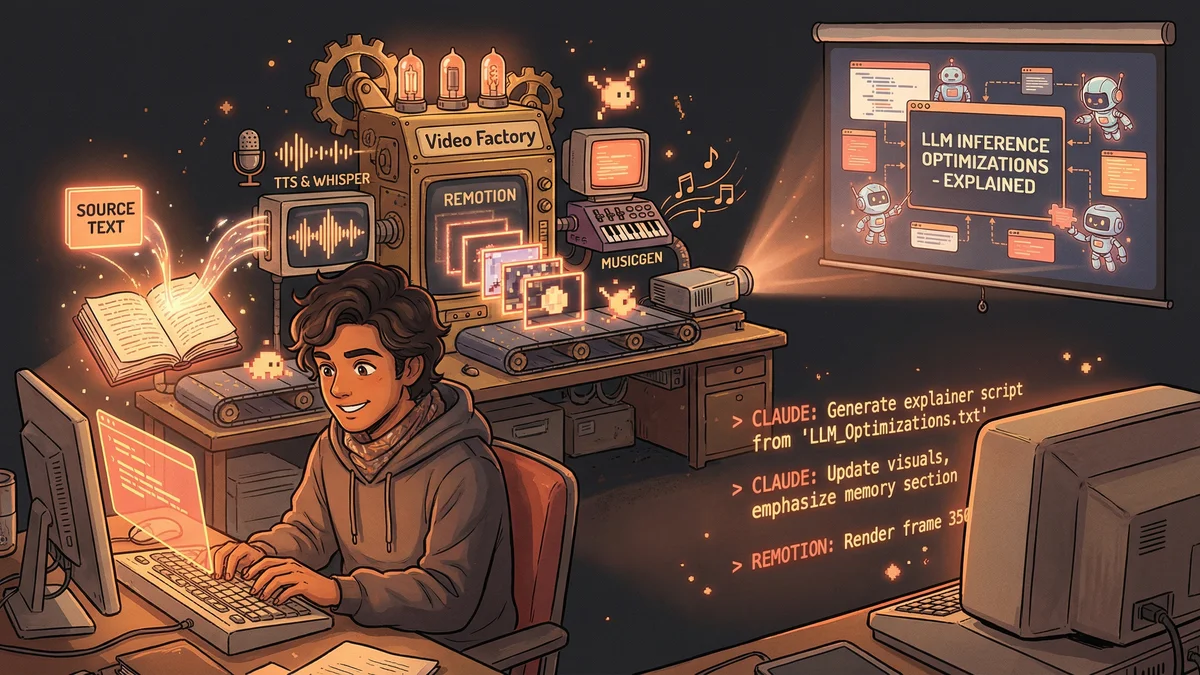
- Stack: Claude Code + Remotion + TTS + MusicGen + Whisper for frame-accurate audio sync
- Natural language feedback loop: “make the font bigger on scene three” updates the video
- Best for: Technical explainers, tutorials, educational content where efficiency beats artistic perfection
- Key lesson: 7/10 quality in hours beats 9/10 quality in weeks for most use cases
An engineer built a video factory in 3 days that takes text documents and produces fully narrated, animated explainer videos with synchronized background music - cutting a 3-4 week manual process to 20 minutes.
Prajwal wanted to make explainer videos.
The topic: LLM inference optimizations. Dense technical content that would benefit from visual explanation.
The problem: video production is hard. Script writing. Voice recording. Animation. Sound design. Editing. Each step requires different skills and tools.
“I’d estimate three to four weeks to make a professional explainer video. And I wasn’t even good at video editing.”
He decided to see if Claude could handle the entire pipeline.
Three days later, he had a working video factory.
The Vision
Not AI-assisted video editing. Fully automated video generation.
Feed in a topic or source document. Get out a complete video: narrated, animated, with music and sound effects.
“I wanted to describe what I wanted in plain English and have a video appear. No editing software. No timeline manipulation. Just describe and receive.”
The Tech Stack
Prajwal assembled components:
Remotion: A JavaScript framework that generates videos programmatically. Instead of dragging clips on a timeline, you write code that produces frames. Perfect for automation.
Text-to-Speech: Multiple options. Microsoft’s Edge TTS for quick, free narration. ElevenLabs for higher quality when needed.
MusicGen: Meta’s open-source AI music generation. Running locally, it could produce background tracks on demand.
Whisper: OpenAI’s speech recognition. For aligning custom voice recordings with video timing.
“Each piece existed. Nobody had assembled them into one Claude-controlled pipeline.”
Day One: The Architecture
Prajwal started with the script generation.
“I gave Claude a technical document about inference optimizations. Said: turn this into a video script with scene breakdowns.”
Claude produced a multi-segment script. Each segment had narration text and visual cues: what should appear on screen at each moment.
Then the structure: how would the video render? Prajwal described the storyboard-first architecture to Claude.
“The system works backwards from narration. Break the script into segments. For each segment, generate visuals that match the words. Timing driven by speech duration.”
Claude built the framework: take script, generate audio, calculate timings, produce Remotion components, render final video.
Day Two: The Components
The second day tackled individual pieces.
Audio generation: Claude integrated the TTS APIs. Given script text, produce audio files. Option to use custom recordings instead.
Visual generation: Claude wrote Remotion components — animated text, simple graphics, transitions. Each scene became a React component.
Timing synchronization: The hard part. When narration says “and then it explodes,” the visual explosion needs to hit exactly on that word.
Whisper solved this. Feed the audio through Whisper to get word-level timestamps. Use those timestamps to trigger visual events.
“Frame-accurate synchronization. Sound effects hit precisely when the narration cues them.”
Day Three: The Feedback Loop
The breakthrough came on day three.
Traditional video editing: make a change, wait for render, watch result, repeat. Slow iteration.
Prajwal built a natural language feedback loop.
“I could type ‘make the font bigger on scene three’ and the system would update. No timeline editing. Just describe the change.”
Under the hood: his CLI tool captured the feedback, fed it to Claude Code in headless mode. Claude interpreted the request, modified the Remotion code, re-rendered.
“Iterating on a video through conversation instead of clicking. It felt like having a video editor assistant who understood English.”
The First Video
The test topic: LLM inference optimizations. Technical content Prajwal understood well.
He fed in his notes. The pipeline ran. Twenty minutes later: a video.
Script generated from notes. Audio rendered from script. Visuals synchronized to audio. Background music layered in. Sound effects punctuating key points.
“It wasn’t perfect on the first pass. Some timing felt off. Some visuals needed adjustment.”
But the feedback loop worked. “Slow down the transition at 1:30.” “Add more emphasis on the memory section.” Each adjustment, a conversation.
Three iterations later: a publishable video.
The Over-Engineering
Prajwal admitted something.
“I wrote 470 automated tests for this project. That’s absurdly over-engineered for a weekend hack.”
But the tests served a purpose. With so many components — script generation, audio synthesis, visual rendering, timing alignment — errors could cascade. Tests caught problems early.
“Every component had unit tests. Integration tests for the pipeline. End-to-end tests for full video generation. When something broke, I knew exactly where.”
The engineering discipline turned a hack into a system.
The Performance Realities
Video generation was computationally expensive.
MusicGen running on CPU: slow. Minutes per track.
Remotion rendering: heavy. Each frame computed, encoded, assembled.
“On my laptop, a 5-minute video took 20 minutes to render. Not instant. But unattended.”
Cloud resources could speed this up. GPU instances for music generation. Parallel rendering. But even on consumer hardware, the system worked — just with patience.
The Voice Options
The TTS trade-off was real.
Free options (Edge TTS): good enough for drafts. Robot-adjacent but comprehensible.
Premium options (ElevenLabs): noticeably better. Natural prosody. Emotional range.
Custom recording: best quality. But required Prajwal to actually record.
“I recorded my own voice for the published version. The system used Whisper to sync the visuals to my timing. Best of both worlds: human voice, automated everything else.”
The Music Integration
Background music set the mood.
MusicGen generated tracks based on text descriptions. “Upbeat electronic background for technical explainer.” “Calm ambient for reflection section.”
The tracks weren’t Grammy-worthy. But they were royalty-free and exactly fitted to video length.
“No searching stock music libraries. No licensing concerns. Just describe what I want and it exists.”
The Implications
Prajwal reflected on what he’d built.
“Video production used to require a team. Writer, voice talent, animator, sound designer, editor. I replaced that team with a pipeline.”
Not for all videos. Creative, artistic content still needed human vision. But for explainers, tutorials, educational content — where the goal is clear communication rather than artistic expression — automation worked.
“The pipeline doesn’t make auteur cinema. It makes useful content efficiently.”
The Scaling Potential
One video proved the concept. The pattern scaled.
Different topics, same pipeline. Update the source document, regenerate the video.
“I could theoretically produce a video a day. Feed different content through the same system. The marginal cost per video drops dramatically.”
Educational content at scale. Explainers for every topic. The content hunger of the internet, met by automated production.
The Quality Bar
Prajwal was honest about limitations.
“The output is good, not great. Maybe 7/10 production quality. A professional studio would do better.”
But 7/10 produced in hours versus 9/10 produced in weeks? For many use cases, the trade-off favored automation.
“Perfection is expensive. Good enough is cheap. Different situations call for different choices.”
The Human Role
Humans hadn’t disappeared from the process.
Prajwal chose the topic, provided source material, reviewed output, gave feedback, made judgment calls about quality.
“The AI did the mechanical work. I did the creative direction. It’s not replacement — it’s collaboration at a different level.”
The skills shifted. Less After Effects proficiency needed. More ability to describe what you want. More editorial judgment about what’s working.
The Future Projection
Prajwal saw the pipeline as early infrastructure.
“In a few years, this will be a product anyone can use. Describe a video, get a video. No technical setup required.”
The current state required engineering skills to assemble. The future state would be accessible to anyone with ideas.
“We’re in the ‘building the tools’ phase. The ‘using the tools’ phase is coming.”
The Final Assessment
Three days. One engineer. A working video production pipeline.
“I was mind-blown that this was possible. Not theoretically possible — actually built and working.”
The video produced wasn’t a demo. It was a real explainer on a real topic, ready to publish.
“The production tools of the future don’t look like editing software. They look like conversations. Describe what you want. Iterate until it’s right. Ship.”