TL;DR
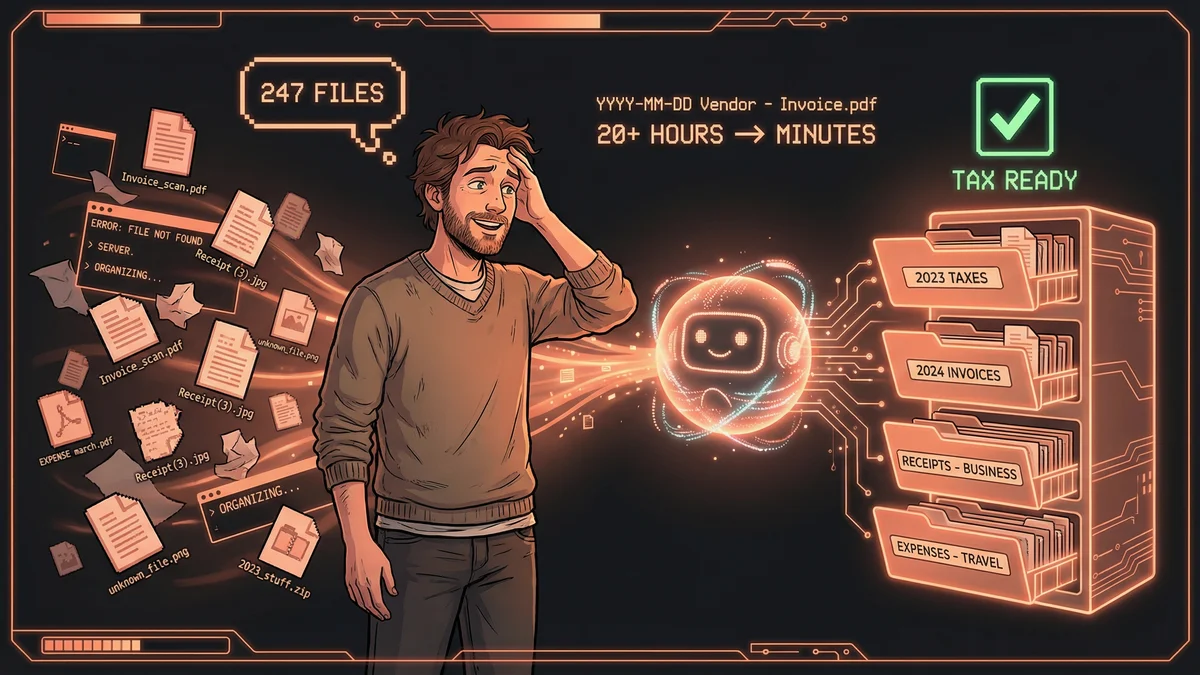
- Claude Code processed 247 chaotic invoices - reading each file, extracting vendor/date/amount, renaming consistently, and sorting by category
- What took 20+ hours manually now takes minutes with AI batch processing
- The naming pattern “YYYY-MM-DD Vendor - Invoice - Description.pdf” makes files instantly searchable and sortable
- Best for: Freelancers and small business owners drowning in disorganized financial documents
- Same pattern works for contracts, receipts, statements - any document type needing consistent organization
Claude Code transformed 247 chaotically-named invoice files into perfectly organized tax-ready folders in minutes - reading each document, extracting key information, and applying consistent naming conventions automatically.
Martin stared at a folder containing 247 invoices.
Tax season had arrived. His accountant needed organized records. Martin had… a digital shoebox.
“Invoice_scan.pdf. Receipt (3).jpg. EXPENSE march.pdf. No dates. No vendor names. No logical order. Just chaos I’d created by being too busy to organize during the year.”
Every year, the same pattern. Work hard, generate invoices, throw them in a folder, panic in April.
The Annual Ritual
Tax preparation for freelancers involves a specific torture.
Gather every invoice. Figure out what each one is. Categorize by expense type. Total by category. Hand organized records to accountant.
“I’d spend an entire weekend on this. Sometimes two. Just reading invoices, renaming files, dragging them into folders. Mind-numbing work that I dreaded for months.”
Martin tried staying organized during the year. It never lasted. By February, the system collapsed. By December, the folder was chaos again.
The Pattern That Stuck
Martin learned about Claude Code from a forum post. Someone mentioned using it for file management.
“I didn’t think of my invoices as ‘files to manage.’ They were just… torture. But technically, yes, they were files.”
He pointed Claude at his invoice folder with a simple request:
“Read each file. Rename it to ‘YYYY-MM-DD Vendor - Invoice - ProductOrService.pdf’. Move it into the right folder based on expense category.”
The First Batch
Claude processed the first fifty invoices.
“Invoice_scan.pdf” became “2024-03-15 Adobe - Invoice - Software Subscription.pdf” and moved to the Software folder.
“Receipt (3).jpg” became “2024-06-22 Office Depot - Invoice - Office Supplies.pdf” and moved to the Supplies folder.
“EXPENSE march.pdf” became “2024-03-08 WeWork - Invoice - Coworking Space.pdf” and moved to the Office folder.
“I watched it happen in real-time. Each file opened, analyzed, renamed, moved. What would have taken me hours took Claude minutes.”
The Recognition Magic
The impressive part wasn’t the renaming. It was the recognition.
Claude read each invoice - even scanned images and PDFs - extracted the vendor name, the date, the service or product description.
“It understood that ‘Adobe Inc.’ and ‘ADOBE SYSTEMS’ and ‘adobe.com’ were all the same vendor. It normalized everything.”
Inconsistent records became consistent. “3/15/24” and “March 15, 2024” and “15.03.2024” all became “2024-03-15”. The date format Martin’s accountant preferred.
The Category Intelligence
Expense categories required judgment. Software subscription or office equipment? Travel expense or client entertainment?
Martin gave Claude his categories upfront:
- Software & Subscriptions
- Office Supplies
- Professional Services
- Travel & Transportation
- Client Entertainment
- Hardware & Equipment
“Claude made reasonable decisions. Adobe went to Software. Uber went to Travel. Restaurant receipts with client names went to Entertainment.”
When uncertain, Claude would ask. “This invoice is for a laptop. Is that ‘Software & Subscriptions’ or ‘Hardware & Equipment’?” Martin would clarify, and Claude would remember for future similar invoices.
The Complete System
Martin’s folder went from nightmare to order:
/Taxes/2024/
├── Software/
│   ├── 2024-01-15 Adobe - Invoice - Creative Cloud.pdf
│   ├── 2024-02-15 Adobe - Invoice - Creative Cloud.pdf
│   └── ...
├── Travel/
│   ├── 2024-03-22 United Airlines - Invoice - SFO to JFK.pdf
│   ├── 2024-03-22 Uber - Invoice - Airport Transfer.pdf
│   └── ...
├── Professional Services/
│   ├── 2024-04-10 Johnson CPA - Invoice - Tax Preparation.pdf
│   └── ...
└── ...
“My accountant actually commented on it. ‘Your records have never been this organized.’ First compliment I’d ever gotten on my bookkeeping.”
The Ongoing Automation
Tax season ended. Martin didn’t return to chaos.
He created a monthly ritual: dump new invoices in an “Inbox” folder, run Claude on the first of each month, watch them sort themselves.
“The annual nightmare became twelve small non-events. Five minutes a month instead of twenty hours once a year.”
He set up Claude to also generate a summary: total spend by category, month-by-month comparison, flagged anomalies.
“I actually understood my business finances now. Not just once a year for taxes, but monthly. Because the data was organized.”
The Verification Layer
Martin didn’t blindly trust the automation.
“Claude would occasionally misread a scanned receipt. Put something in the wrong category. Miss a decimal point.”
He built in a review step. After processing, Claude would present a summary: “Here’s what I moved and why. Any corrections?”
Martin would spot-check. Catch the occasional error. Make adjustments. The system improved as Claude learned his corrections.
“It’s not perfect automation. It’s assisted automation. I still review. But reviewing is way faster than doing.”
The Tax Season Transformation
The following April arrived. Martin’s preparation took two hours.
Review the organized folders. Run Claude’s summary report. Send everything to the accountant.
“My accountant asked what changed. I told him about Claude Code. He said half his clients should be using this.”
The dread was gone. Tax season was just another month with a deadline. The work was already done throughout the year.
The Expanded Scope
Success with invoices led to other document types.
Contracts: renamed with parties and dates, sorted by status (active, expired, pending). Receipts: separated from invoices, organized by purpose. Statements: bank statements, credit card statements, sorted by account and month.
“My entire financial paper trail went from chaos to order. The same pattern worked everywhere: read, rename, sort, verify.”
The ROI Calculation
Martin did the math.
Old system: 20+ hours per year on tax preparation, plus mental dread for months before. New system: ~1 hour per month of oversight, no dread, better financial visibility.
“Even valuing my time at minimum wage, the savings were obvious. At my actual billing rate? It wasn’t even close.”
The accountant’s bill dropped too. Less time spent deciphering Martin’s mess meant faster, cheaper tax preparation.
The Advice for Freelancers
“Don’t wait until tax season. Set up the system now. Create your category folders. Write your naming convention. Let Claude do one month of invoices as a test.”
The initial setup took an afternoon. Every month afterward took minutes. The annual nightmare disappeared.
“Your future self will thank your present self. Tax season doesn’t have to be torture. It can be boring. And boring is so much better.”