TL;DR
- Senior accountant reduced invoice processing from 2 hours to 30 minutes daily
- Claude’s vision reads messy documents OCR cannot — photos, handwriting, coffee stains
- 20x ROI: $100/month AI cost saves $2,000+/month in labor plus fraud prevention
- Best for: finance teams processing high volumes of variable-format invoices
- Key insight: AI found $12,000 duplicate billing in first months — single catch paid for six months
A senior accountant automated 300 monthly invoices with Claude’s vision AI, cutting daily processing from 2 hours to 30 minutes while achieving 20x ROI and catching duplicate billings worth thousands.
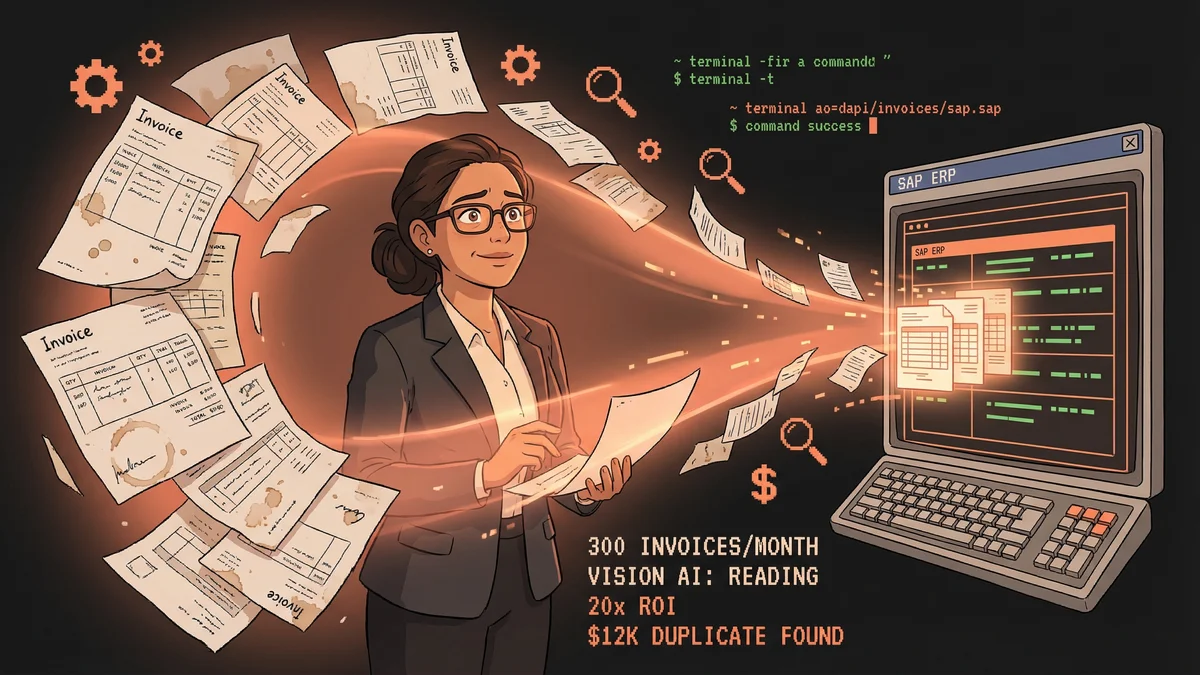
Carla processed 300 invoices per month.
Each invoice arrived as a PDF. Different vendors, different formats, different levels of chaos. Some were machine-readable. Others were scanned images of handwritten documents. A few were photographs of receipts taken on someone’s phone.
“I’d spend two hours every morning just opening PDFs and typing numbers into our ERP system. The same routine, 300 times a month.”
Carla’s company used SAP. Every invoice needed: vendor ID, invoice number, line items, tax amounts, totals. Manual entry for each.
“The work was mind-numbing. And I was expensive. A senior accountant doing data entry — terrible ROI.”
The Initial Attempt
Carla had tried OCR tools. They worked on clean PDFs. They failed on scanned documents, photos, or any format that varied from their training data.
“Traditional OCR needed perfect inputs. I didn’t have perfect inputs. I had chaos.”
Then she learned Claude could see images.
The Vision Capability
Carla ran an experiment. Uploaded a messy invoice image — a photo of a receipt with coffee stains and handwriting — and asked Claude to extract the data.
Claude read it. Vendor name. Date. Line items. Totals. Even the handwritten notes.
“It saw what OCR couldn’t. It understood what the document meant, not just what characters it contained.”
The extracted data wasn’t perfect. But it was 90% accurate — vastly better than starting from nothing.
The Workflow Architecture
Carla built a processing pipeline:
1. Watch Folder New invoice PDFs dropped into a designated folder. A script detected new files within minutes.
2. Document Triage Claude received each document and classified it: invoice, receipt, credit note, statement. Different types needed different processing.
3. Data Extraction For invoices, Claude extracted structured data: vendor info, line items, tax, totals. Output formatted as JSON.
4. Validation Claude cross-referenced vendor names against the company’s vendor database (via MCP connection to SAP). Unknown vendors got flagged.
5. Anomaly Detection Claude compared extracted data against historical patterns. Unusual amounts, duplicate invoice numbers, or mismatched PO numbers triggered alerts.
6. Staging Validated data queued for human review before posting to the ledger.
“The AI did the extraction and checking. I did the approving and posting. We each did what we were good at.”
The MCP Connection
The breakthrough came from connecting Claude to SAP.
An MCP server exposed safe read operations:
- Query vendor master data
- Look up purchase orders
- Check historical invoice patterns
- Retrieve payment terms
Claude could verify extracted data against authoritative sources without human help.
“If an invoice claimed to be from ‘Acme Corp’ but our vendor database had ‘ACME Corporation Inc.’, Claude caught the discrepancy and asked: is this the same vendor?”
The Anomaly Detection
Pattern recognition proved unexpectedly valuable.
Claude noticed things Carla had missed:
- A vendor invoicing twice for the same service in consecutive months
- Tax calculations that didn’t match the stated rate
- Line items with prices 30% higher than historical average
“Claude found a $12,000 duplicate billing I would have missed. That one catch paid for six months of AI processing costs.”
The Document Zoo
Real invoices came in every imaginable format.
The Good: Clean digital PDFs with structured data. Claude extracted with 98% accuracy.
The Bad: Scanned documents with slight rotations or low resolution. 85% accuracy after Claude applied correction.
The Ugly: Photos of handwritten receipts from contractors. 70% accuracy, always requiring human review.
“We triaged by quality. Good documents went straight through. Bad documents got flagged for extra attention. Ugly documents became manual backup.”
The Edge Cases
Some patterns required special handling.
Multi-currency invoices: Claude learned to detect currency codes and convert using MCP access to exchange rate data.
Partial invoices: When vendors invoiced against long-running POs, Claude tracked remaining amounts and flagged over-billing.
Handwritten amendments: Some invoices had handwritten corrections. Claude learned to note these for mandatory human review.
“Every edge case became a rule. The rule base grew, and the edge cases shrank.”
The Time Savings
Before automation:
- 2 hours/day invoice processing
- 300 invoices/month
- Error rate: ~3% requiring correction
After automation:
- 30 minutes/day reviewing Claude’s extractions
- 300 invoices/month (same volume)
- Error rate: ~1% (Claude caught more anomalies)
“I got 1.5 hours of my day back. Every day. For the same output quality.”
The Cost Analysis
Monthly costs:
- Claude API: ~$80 for document processing
- MCP server hosting: ~$20
- Total: $100/month
Monthly savings:
- 30 hours × senior accountant rate = $2,000+
- Duplicate billing prevention = variable but significant
ROI: 20x minimum.
“The math was so obvious my CFO approved the project in one meeting.”
The Audit Trail
Every extraction was logged:
- Original document
- Claude’s interpretation
- Confidence scores
- Any anomalies flagged
- Human reviewer’s decision
“When auditors asked how we processed invoices, I showed them the logs. They loved it. More documentation than we’d ever had manually.”
The Vendor Relationship Effect
Carla noticed an unexpected benefit.
“We started catching vendor errors faster. Duplicate invoices, wrong amounts, expired payment terms. When we contacted vendors about discrepancies, they were surprised we caught them so quickly.”
The company’s reputation for careful invoice review improved. Vendors sent cleaner invoices knowing they’d be scrutinized.
The Expansion
Success bred expansion.
The team added:
- Purchase order matching: Claude verified invoices against POs, flagging discrepancies
- Expense report processing: Same vision capability, applied to employee receipts
- Contract extraction: Key terms from vendor contracts stored for reference
“We went from one use case to five. Each shared the same infrastructure but solved different problems.”
The Limitations Acknowledged
Not everything worked perfectly.
“Really damaged documents — water damage, severe crumpling — still needed human interpretation. Claude would say ‘I can’t read this section’ rather than guess.”
Claude’s honesty about uncertainty was valuable. Overconfident extractions would have been dangerous. “I don’t know” was the right answer sometimes.
The Current State
Two years later, invoice processing is a background task.
Carla reviews extractions between meetings, approving batches with a few clicks. The manual grind is gone. The expertise — understanding context, catching fraud, managing vendors — remains human.
“I’m still the accountant. I still do accounting. I just don’t do data entry anymore.”
The 300 invoices arrive. The AI processes. Carla reviews. The ledger stays accurate.
“I thought AI would replace my job. Instead, it replaced the part of my job I hated.”