TL;DR
- 18 specialized AI agents automate every business function from legal to finance to hiring
- Agents work proactively: flag expiring contracts, detect churn risk, monitor competitors, prep meetings
- Built on OpenClaw + Claude Code - no traditional coding required
- Best for: Business owners drowning in “silent drag” (forgotten renewals, cold leads, missed signals)
- Key lesson: AI teams beat AI assistants - specialized agents that communicate create compounding value
Nate built an AI operations team of 18 specialized agents. They handle contracts, invoices, vendors, email, hiring, compliance, and competitive intelligence. No manual tracking. No forgotten renewals. Just proactive automation across every business function.
Most businesses use AI as an assistant. You ask ChatGPT a question, it answers, conversation ends. Nate took a different approach: he built an AI team.
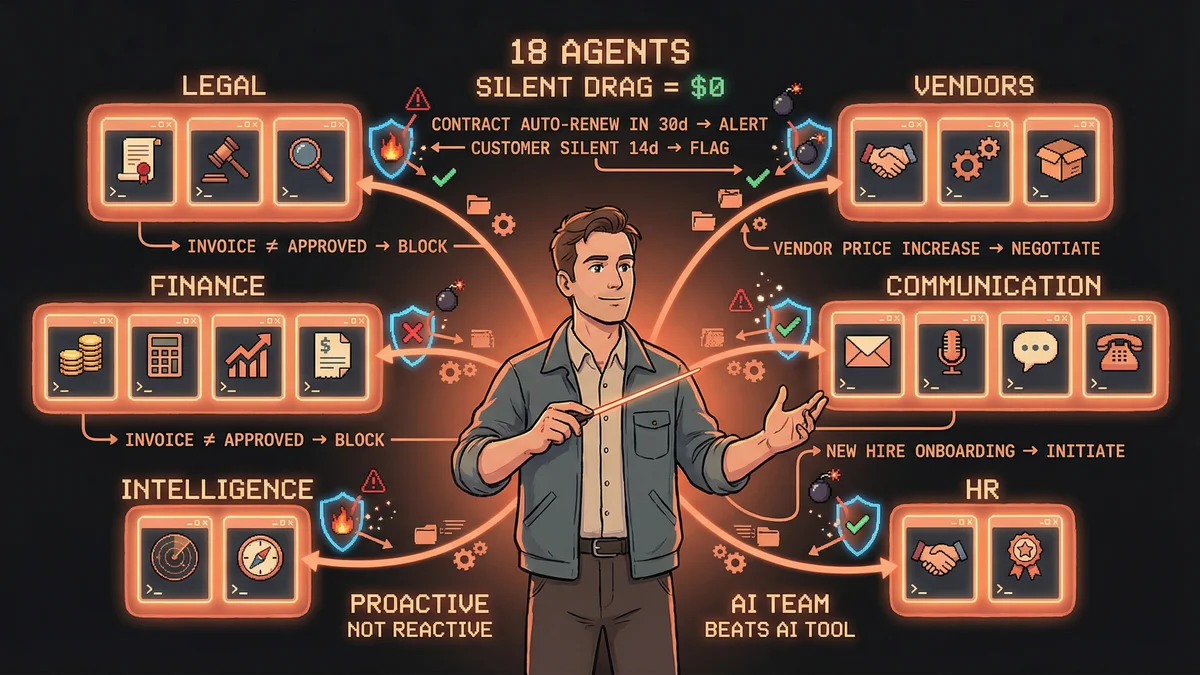
Not one general-purpose chatbot doing everything poorly. Eighteen specialized agents, each owning a specific business function. They monitor systems continuously, flag problems before they become crises, and communicate with each other to spot patterns.
The result: a business that prevents problems instead of reacting to them.
The Silent Drag Problem
Every business has “silent drag” - the stuff that doesn’t feel urgent but quietly bleeds money:
- Forgotten vendor contracts that auto-renew at last year’s pricing
- Customer relationships that go cold because you forgot to check in
- Invoice discrepancies nobody catches until the annual audit
- Competitor hiring signals (they’re scaling support - are they launching something?)
- Subscriptions you forgot you’re paying for
None of this is dramatic. It’s just slow erosion. By the time you notice, you’ve lost the deal, overpaid for months, or let the relationship die.
Nate’s solution: agents that watch for silent drag 24/7.
The AI Team: 18 Agents Across 6 Functions
Legal & Compliance (3 agents)
1. Contract & Agreement Tracker Ingests every contract and agreement. Tracks renewal dates. Auto-reminds you 30/60/90 days before expiration. Flags unfavorable terms buried in legalese.
The value: you never get caught in auto-renewal hell again. No more “wait, we’re still paying them $5K/month for that?”
2. Legal/Compliance Deadline Tracker Monitors state filings, license renewals, tax deadlines, insurance renewals. Gives you lead time to act instead of scrambling day-of.
3. SOW/Proposal First Draft Generator Takes your discovery call notes. Produces a first-draft proposal in your format within minutes. You edit and approve - the agent handles the template work.
Finance & Accounting (3 agents)
4. Invoice Reconciliation Monitors incoming invoices against what was actually authorized. Flags discrepancies (did they bill for 40 hours when you approved 32?). Tracks overdue payments owed to you.
5. Weekly P&L Narrative Pulls your financial data and writes a plain-English summary: “Revenue up 12% this week driven by three new enterprise deals. Costs spiked due to contractor overage on Project X.”
Not spreadsheets. Stories.
6. Expense Categorization & Anomaly Detection Watches bank and credit card feeds. Auto-categorizes expenses. Flags unusual charges or forgotten subscriptions (why are we paying $99/month for that tool nobody uses?).
Vendor & Partner Management (3 agents)
7. Vendor Performance Scoring Tracks every vendor and contractor. Logs delivery times, quality issues, pricing changes. Builds a living scorecard so you know who’s reliable when it’s time to scale.
8. Price/Rate Change Monitor Watches pricing pages for your tools, SaaS vendors, contractors. Alerts when something changes. Helps you renegotiate before the new rate hits your card.
9. Partnership/Deal Flow Tracker Logs every inbound opportunity (partnerships, affiliate deals, media requests). Tracks status. Reminds you to follow up. Scores deals by potential value so you prioritize correctly.
Communication & Customer Success (4 agents)
10. Email Triage & Draft Responses Processes your inbox. Categorizes by urgency. Drafts responses in your voice for approval. Auto-archives noise (newsletters, notifications, spam).
11. Customer Communication Gap Detector Flags any client or customer you haven’t communicated with in X days. Prevents relationships from going cold. Simple but powerful - most churn happens because you forgot to check in.
12. Meeting Prep Autopilot Researches the person/company before every meeting. Pulls past notes and history from your knowledge base. Sends you a 60-second briefing so you walk in prepared.
13. Churn Early Warning System Tracks engagement signals: communication frequency, product usage, sentiment in emails. Flags accounts likely to leave before they tell you they’re leaving.
Competitive Intelligence (2 agents)
14. Competitor Job Posting Monitor Watches competitor LinkedIn pages and job boards. Hiring signals investment (they’re scaling support - launching something?) or struggle (replacing entire teams - turnover?).
15. Personal Brand Monitor Tracks mentions of your name and company across social media, forums, review sites, news. Alerts you to anything worth responding to - customer complaints, partnership interest, or press coverage.
HR & Hiring (1 agent)
16. Hiring Pipeline Manager Tracks candidates through your interview process. Schedules follow-ups. Sends status updates. Flags when someone sits too long without a decision (candidate experience matters - don’t ghost people).
Knowledge & Decision Management (2 agents)
17. Daily Decision Log Records every significant decision you make, the reasoning, and who was involved. Creates a self-audit trail. Six months later when someone asks “why did we choose vendor X?” - the answer is logged.
18. Knowledge Base That Actually Works Ingests every article, video, resource, or lesson you consume. Tags it by concept, not just keyword. Makes it searchable by idea: “What did I read about pricing psychology last quarter?”
How It Works: OpenClaw + Claude Code
Platform: OpenClaw (open-source autonomous AI agent platform) Engine: Claude Code (natural language AI that writes automations) Integration points: Email, bank feeds, calendar, LinkedIn, pricing pages, social monitoring, CRM, financial systems
You don’t write traditional code. You describe what the agent should do in plain English. Claude Code builds the automation. OpenClaw runs it continuously in the background.
Example: “Monitor our bank feed. Categorize expenses by type. Flag any charge over $500 I didn’t personally approve.”
The agent does the rest.
The Security Question
One community response flagged the obvious concern: connecting AI to bank feeds and sensitive data.
This matters. If you’re building agents that access financial systems, customer data, or proprietary information, you need proper security setup. OpenClaw documentation covers secure credential handling. Don’t skip it.
The promise of automation doesn’t justify sloppy security.
Why This Matters: From Reactive to Proactive
Most businesses are reactive: something breaks, you fix it. A customer churns, you try to win them back. An invoice is wrong, you dispute it after the fact.
Nate’s AI team is proactive: contracts flag before they auto-renew. Customers get flagged before they churn. Invoices get verified before you pay them.
The shift from reactive to proactive is the entire game. Reactive businesses spend all their time putting out fires. Proactive businesses prevent fires from starting.
The Compounding Effect
One agent saves you time. Eighteen agents that talk to each other create compounding value:
- The churn warning system flags a cold account
- The communication gap detector confirms you haven’t checked in
- The meeting prep agent researches the customer’s business
- The email agent drafts a re-engagement message in your voice
You review and send. One 5-minute action informed by four agents working together.
That’s the difference between AI assistants (isolated tools) and AI teams (coordinated systems).
What Gets Eliminated
Here’s what Nate’s business no longer does manually:
- Contract renewal tracking
- Invoice verification
- Vendor research and evaluation
- Email management
- Meeting prep research
- Customer health monitoring
- Expense categorization
- Compliance deadline tracking
- Competitor intelligence gathering
- Hiring pipeline management
- Decision documentation
- Knowledge retrieval
All of it handled by specialized agents.
The Real Cost: Silent Business Drag
The ROI isn’t “I saved 10 hours this week.” The ROI is “I stopped the silent bleeding.”
- Contracts that don’t auto-renew at inflated rates
- Customers who don’t churn because you forgot to check in
- Invoices that don’t slip through unverified
- Opportunities that don’t die because you forgot to follow up
- Competitors who don’t surprise you because you’re tracking their signals
The value compounds over time. One forgotten renewal costs you $5K. One churned customer costs you $50K in lifetime value. One missed opportunity costs you the deal.
Multiply that by a year of forgotten renewals, cold customers, and missed signals.
That’s what these 18 agents prevent.
Where to Start
You don’t need all 18 on day one. Start with the highest-pain area:
- Drowning in email? Build agent #10 (email triage)
- Losing customers to silence? Build agent #11 (communication gap detector)
- Vendor bills out of control? Build agent #4 (invoice reconciliation)
- Competitor blindness? Build agent #14 (job posting monitor)
Build one. Let it prove value. Add the next.
The real leverage comes when agents start talking to each other. That’s when reactive firefighting becomes proactive prevention.
The Bigger Picture
Nate’s setup represents a shift: AI as team, not tool.
Most businesses use AI for one-off tasks: write an email, summarize a document, answer a question. Nate built a team of specialists that own entire functions.
The legal agents prevent compliance disasters. The finance agents catch billing errors. The customer success agents prevent churn. The intelligence agents spot competitor moves.
Together, they eliminate silent business drag.
That’s the future: not asking AI for help when you remember to ask. Building AI teams that work whether you’re online or not.