TL;DR
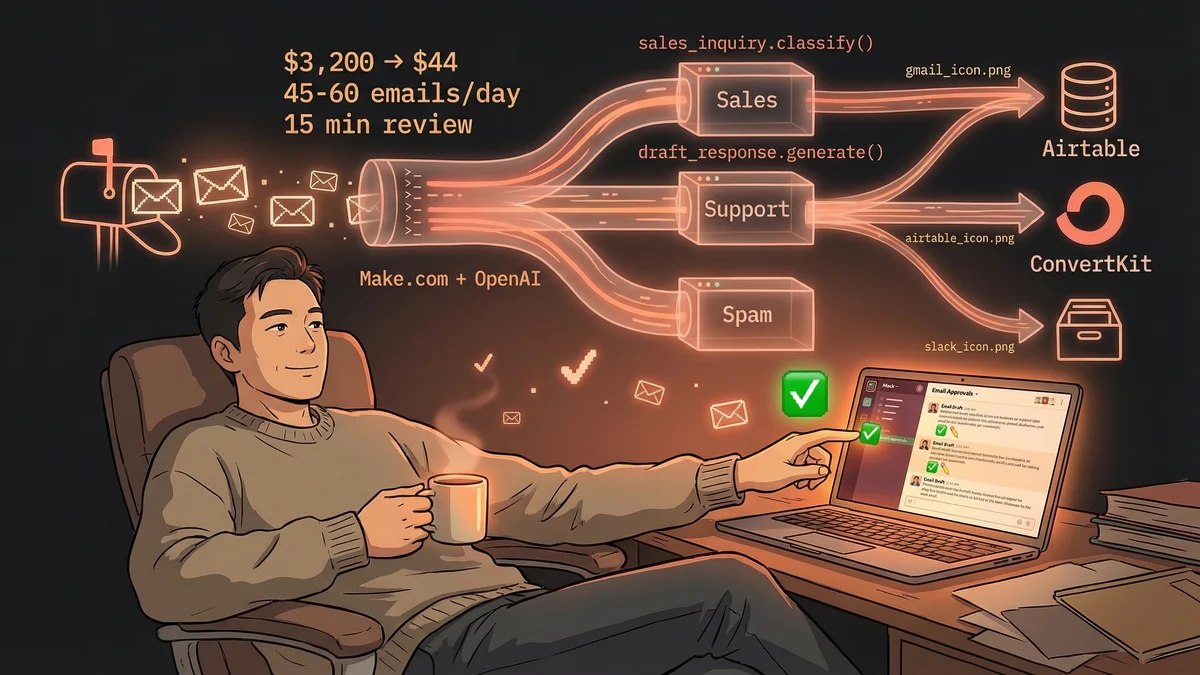
- $3,200/month VA replaced with $44/month automation (98.6% cost savings)
- 45-60 emails classified daily — sales, support, partnerships, spam
- OpenAI drafts responses based on playbooks, human reviews in 15 minutes
- Tech stack: Make.com, OpenAI API, Gmail, Airtable, ConvertKit, Slack
- Key lesson: If someone’s being paid to pattern-match, AI can probably do it better
A business owner replaced a full-time virtual assistant with a Make.com workflow, cutting email management costs from $3,200/month to $44/month while maintaining the same output quality.
The $3,200 Problem
Most businesses hit the same inflection point: email volume crosses from “manageable” to “full-time job.” The standard solution is hiring a VA to:
- Monitor the inbox
- Categorize inquiries (sales, support, spam)
- Draft responses
- Update the CRM
- Flag urgent items
For one service business, this meant $3,200/month for a VA spending 4-5 hours daily on inbox management.
The work wasn’t complex. It was pattern-matching: read email → determine type → draft appropriate response → log it → route if urgent. Necessary work. Repetitive work. Automatable work.
The Make.com Solution
Instead of renewing the VA contract, the owner built an automation that handles the entire workflow:
The Flow
1. Email arrives → Gmail module triggers the workflow
2. OpenAI classifies the email:
- Sales inquiry (hot/warm/cold)
- Customer support request
- Partnership inquiry
- Spam/irrelevant
3. Action based on classification:
Sales (hot lead):
- Creates Airtable CRM record
- Drafts personalized response using saved sales playbook
- Sends Slack alert
Sales (warm lead):
- Adds to nurture sequence in ConvertKit
- Drafts value-add response (case study, resource)
Support ticket:
- Checks FAQ database
- Drafts response with solution
- Sends for human review
Partnership inquiry:
- Logs inquiry details
- Sends standard partnership deck
- Schedules follow-up task
Spam:
- Archives automatically (no alert)
4. Human review:
- All drafted responses appear in a Slack channel
- Tap ✅ to send, ✏️ to edit
- 15 minutes daily for final approval
The Numbers
Volume processed:
- 45-60 emails per day
- 7 days a week (automation doesn’t take weekends off)
- Previously required 4-5 hours of VA time daily
Cost breakdown:
- Make.com Pro plan: $29/month
- OpenAI API usage: ~$15/month
- Total: $44/month
Replaced cost:
- Virtual assistant: $3,200/month
- Savings: $3,156/month
- Annual savings: $37,872
Human time required:
- Review drafts in Slack: 15 minutes/day
- Tune prompts/playbooks: ~1 hour/month
ROI:
- Break-even: Day 1 (setup took one weekend)
- Cost reduction: 98.6%
- Quality: Same or better (AI never cuts corners when tired)
What Happened to the VA?
The VA wasn’t fired. She was reallocated to strategic work that requires human judgment:
- Client relationship management
- Complex negotiation support
- Partnership vetting and outreach
- Process improvement projects
The owner called it a “win-win” — the business saves money, and the VA does more interesting work.
Lessons Learned
1. Pattern-matching work is AI’s sweet spot
If the task is “read → classify → respond according to rules,” AI will do it faster and more consistently than a human. Email inbox management is pure pattern-matching.
2. Human-in-the-loop prevents mistakes
Full automation would be a mistake. The 15-minute Slack review step catches:
- Misclassified emails (support flagged as spam)
- Wrong tone in drafted response
- Edge cases the AI hasn’t seen before
This design addresses the #1 objection: “What if AI makes a mistake?”
Answer: It goes to Slack for review. Customers never see an unapproved AI response.
3. Prompts are your new playbooks
The quality of AI responses depends entirely on the “sales playbook” and “support FAQ” fed into the prompts. Good prompts = good drafts. The first two weeks were spent tuning these templates.
4. Build for the volume you have today
This workflow handles 45-60 emails/day. If volume hits 200/day, the only cost increase is OpenAI API usage (~$15 → ~$50). Make.com pricing stays flat. The system scales without adding headcount.
5. The real win is time reallocation
$38K/year saved is significant. But the bigger win is reallocating 4-5 hours/day from repetitive inbox work to strategic growth activities. AI didn’t eliminate the human — it freed them to do human work.
Who Should Build This?
You should build this if:
- You’re paying someone to manage email (VA, admin, support rep)
- Email volume is high but categorizable (sales/support/spam)
- Most responses follow templates or patterns
- You want human oversight but not manual drafting
You probably don’t need this if:
- Email volume < 20/day (manual is fine)
- Every response requires deep customization
- Emails don’t fall into clear categories
The Pattern-Matching Framework
This workflow works for any business function based on pattern-matching:
- Customer support: Ticket classification → FAQ lookup → draft response
- Sales outreach: Lead scoring → sequence enrollment → personalized follow-up
- Recruiting: Resume screening → category fit → interview invitation
- Accounting: Invoice classification → approval routing → payment scheduling
The question isn’t “Can AI replace my VA?” The question is: “Which tasks am I paying humans to pattern-match?”
For email inbox management, the answer is clear. And the savings are $38K/year clear.