TL;DR
- Sales pro automated warm lead nurturing with FREE Claude Desktop + FREE Notion
- No Zapier, no Make, no API middleware costs
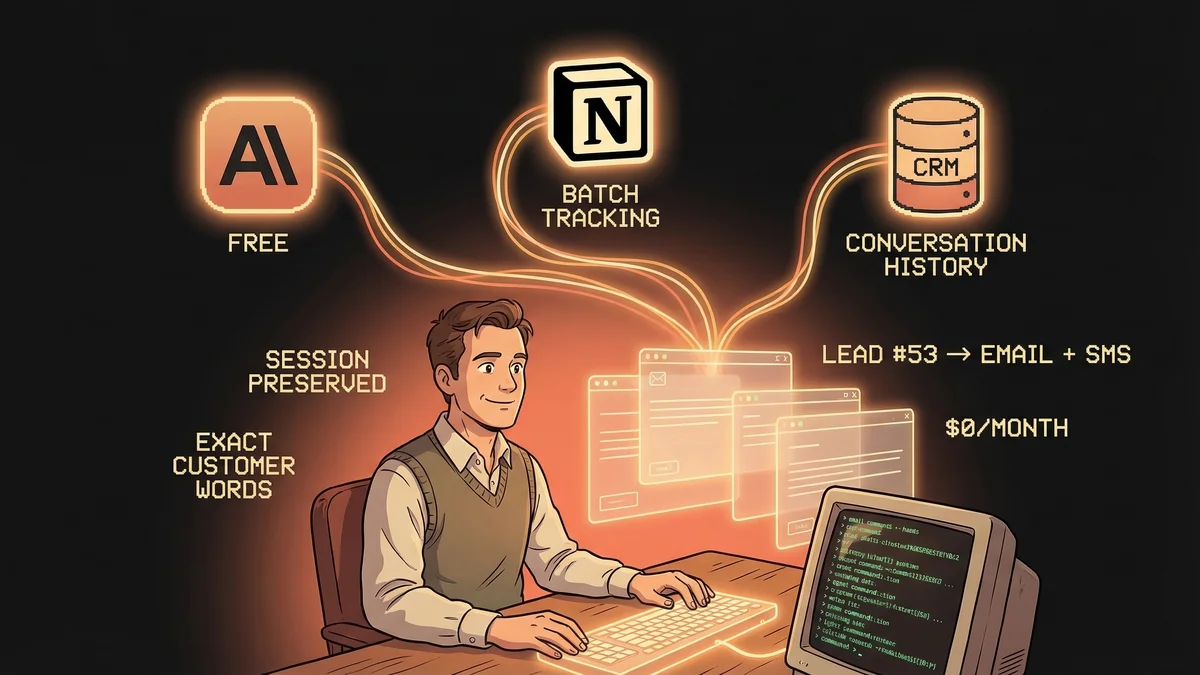
- Writes 4-paragraph personalized emails + SMS using exact customer language from CRM conversation history
- Session persistence via Notion batch tracking — Claude picks up where it left off, zero context loss
- Best for: Sales teams, BDRs, consultants managing warm leads in GoHighLevel or similar CRMs
- Key lesson: Session state management is the difference between “AI demo” and “production workflow”
A sales professional built a fully automated warm lead outreach system using only free tools—Claude Desktop and Notion—with zero integration middleware.
Most AI sales automation demos show you the first email. Then quietly break when you ask “how does it remember what happened yesterday?”
Brady Butler’s system doesn’t break. It resumes.
The difference? Batch tracking in Notion. Session state preserved across conversations. Zero context loss.
The Session Persistence Problem
AI workflows fail at session boundaries.
You start fresh every time. No memory of which leads you processed. No tracking of batch progress. No context from yesterday’s work.
That’s fine for demos. Useless for production.
Brady’s system solves this with a simple architecture:
- SOP lives in Notion — Claude fetches it at session start
- Batch tracking lives in Notion — status updates after every lead
- Next session starts where the last one ended — no manual handoff
Claude Desktop’s MCP integration makes this work. Notion becomes the memory layer. The CRM provides the raw material.
How the 3-Tool Stack Integrates
Claude Desktop (free):
- Orchestrates the workflow
- Reads SOPs, writes emails, generates SMS
- Connects to Notion and GoHighLevel via MCP servers
Notion (free):
- Stores the outreach SOP (instructions for Claude)
- Tracks batch state (which leads processed, what’s next)
- Acts as session memory across conversations
GoHighLevel (GHL):
- Stores opportunity notes, contact records, conversation history
- Provides the raw material: what did the lead say? What’s their pain?
- Most sales teams already pay for CRM — this just adds AI on top
No Zapier. No Make. No n8n. No API glue code.
Just Claude Desktop MCP servers connecting to the tools you already use.
The Workflow (Step-by-Step)
Session Start:
- Claude fetches the outreach SOP from Notion
- Reads batch tracking doc: “Processed 47 leads. Next: batch 48-72.”
- Loads context from last session
Per Lead:
- Pull opportunity notes from GHL
- Pull contact record (name, company, role)
- Pull full conversation history (what did they say on the call?)
- Identify which sales team member they spoke with
- Extract exact pain points and objections from conversation notes
- Write personalized 4-paragraph email using the lead’s actual words
- Generate matching SMS nudge (shorter, conversational, same context)
- Update Notion batch tracker: “Lead #53 processed. Email drafted. SMS drafted.”
Session End: Notion knows exactly where the workflow stopped. Next session resumes at lead #54.
Why “Exact Customer Words” Matters
Most AI outreach uses templates.
“Hi {{FirstName}}, I noticed your company {{CompanyName}} is growing fast…”
Generic. Obvious. Ignored.
Brady’s system pulls conversation history from the CRM. It reads what the lead actually said during the sales call. Their pain points. Their objections. Their timeline.
Then it writes a follow-up email using their language.
If the lead said “our billing process is a mess and it’s costing us deals,” the email references billing process and lost deals — not generic “improve efficiency.”
That’s real personalization. Not mail merge.
The Email + SMS Architecture
Every lead gets two touchpoints from the same context:
Email (4 paragraphs):
- Reference the conversation (“You mentioned on the call that…”)
- Acknowledge the pain point (using their exact words)
- Frame the solution (tied to what they said they need)
- Next step (specific, low-friction)
SMS (short nudge):
- Same context, conversational tone
- Sent alongside email for multi-channel reach
- “Hey [Name], following up on what we discussed about [their pain point]. Check your email for next steps.”
Both generated from the same CRM data. Both personalized. Both contextually accurate.
Session Persistence: The Production Workflow Unlock
Here’s what breaks most AI workflows:
- Monday: Process 50 leads, Claude session ends
- Tuesday: Start fresh. Which leads did I do yesterday? No idea. Reprocess? Skip? Guess?
Here’s what Brady’s system does:
- Monday: Process 50 leads. Notion tracking: “Batch 1 complete. Next: Batch 2 (leads 51-100).”
- Tuesday: Claude fetches Notion. Reads: “Start at lead 51.” Resumes exactly where Monday ended.
Session state is preserved. Not in Claude’s memory (that resets). In Notion.
This is the difference between “cool AI demo” and “tool I use every day.”
Who Should Build This
You’re a fit if:
- You manage warm leads (inbound, referrals, event sign-ups)
- You have conversation history in your CRM (call notes, demo feedback, pain points)
- You send personalized follow-ups at scale
- You’re tired of templates that sound like templates
- You use GoHighLevel (or a CRM with Claude Desktop MCP support)
You’re NOT a fit if:
- You only do cold outreach (this needs conversation history to personalize from)
- Your CRM doesn’t integrate with Claude Desktop
- You don’t have detailed notes in your CRM (garbage in = garbage out)
The Free Tool Economics
Most sales automation stacks cost $200-500/month:
- CRM: $100-200
- Zapier/Make: $50-150
- AI credits: $20-50
- Email automation: $30-100
Brady’s stack costs $0/month (if you already have a CRM):
- Claude Desktop: Free account
- Notion: Free workspace
- GoHighLevel: You’re already paying for this
The only cost is the CRM you were using anyway. Everything else? Free.
Lessons Learned
1. Session state is the bottleneck. AI can write great emails. But if it forgets what it did yesterday, it’s a toy, not a tool. Notion batch tracking solves this.
2. Free tools can run production workflows. You don’t need enterprise AI platforms. Claude Desktop + Notion + your CRM is enough.
3. Personalization = using their words, not yours. Pull conversation history. Use exact pain points. Reference specific objections. That’s how you sound human, not automated.
4. Multi-channel output from one context. Email + SMS from the same CRM data. Same personalization. Different format. Higher engagement.
5. SOPs in Notion = portable intelligence. Your workflow instructions live in Notion. Update the SOP, Claude follows the new process. No re-training.
What This Means for Sales Teams
Before this workflow:
- BDR manually reviews 50 warm leads
- Writes personalized follow-ups (2-3 min per lead)
- 100-150 minutes/day on outreach emails
- Inconsistent quality (tired = worse emails)
After this workflow:
- Claude reviews conversation history, writes emails + SMS
- BDR reviews drafts, approves/edits
- 15-30 minutes/day on outreach
- Consistent quality (AI doesn’t get tired)
- Session persistence means work resumes instantly
That’s 80-90% time savings on high-touch outreach. Same personalization quality. Better consistency.
The paradigm shift: Your CRM becomes the memory. Claude becomes the writer. Notion becomes the coordinator. You become the editor and closer.
Free tools. Production workflow. Revenue-generating automation.
No Zapier required.